
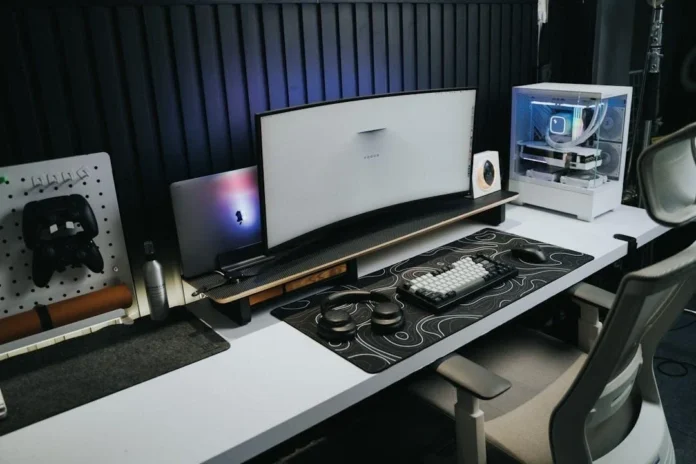

PC gaming is no longer only about having a powerful processor, graphics card, or large amount of RAM. The accessories surrounding your computer can have an equally noticeable impact on how comfortable, responsive, and enjoyable every gaming session feels. A precise mouse can improve aiming, a responsive keyboard can make controls feel faster, and a quality headset can help you hear important audio cues.
For gamers building or upgrading a setup in 2026, the goal should not be to purchase every product marketed as “gaming.” Instead, choose accessories that solve real problems. From competitive FPS players who need accurate inputs to casual gamers who want better comfort during long sessions, the right equipment depends on how you play. This guide from eurogamersonline explores the most useful PC gaming accessories worth considering this year.
1. High-Precision Gaming Mouse
A gaming mouse remains one of the most important accessories for a PC setup. Your mouse directly controls aiming, camera movement, menu navigation, and many everyday actions. A good model should feel comfortable in your hand while providing consistent tracking and responsive clicks.
In 2026, wireless gaming mice are particularly attractive because modern wireless connections can provide excellent responsiveness without leaving a cable across the desk. However, wired models remain excellent choices for gamers who prefer simplicity and never want to worry about charging.
Consider these features when choosing a mouse:
- Comfortable shape for your grip style
- Accurate optical sensor
- Lightweight construction
- Reliable switches
- Adjustable sensitivity
- Programmable buttons when needed
Competitive players may prefer lightweight designs, while MMO gamers can benefit from additional side buttons.
2. Mechanical Gaming Keyboard
A keyboard is another accessory you use constantly, making comfort and reliability more important than decorative RGB lighting. Mechanical keyboards remain popular because they offer distinct key feedback, durable construction, and a wide range of switch options.
Competitive gamers should look for fast actuation and responsive inputs, while people who spend time typing as well as gaming may prefer switches that provide a satisfying but comfortable feel. Compact 60%, 65%, and 75% layouts can also provide additional desk space for mouse movement.
Some modern gaming keyboards provide adjustable actuation, hot-swappable switches, customizable profiles, and rapid input features. These options can be particularly useful for competitive games where quick movement matters.
3. Gaming Headset With a Clear Microphone
Sound can completely change a gaming session. A quality headset lets you hear footsteps, environmental effects, dialogue, and directional audio more clearly while also providing communication during multiplayer matches.
When shopping for a headset, do not focus only on virtual surround-sound claims. Comfort, microphone quality, sound balance, and connection reliability are often more important for everyday use.
Wireless headsets provide freedom from cables, while wired headsets can be simpler and eliminate battery concerns. If you regularly play competitive multiplayer games, prioritize a microphone that delivers clean voice communication.
A good headset should provide:
- Comfortable ear cushions
- Clear voice pickup
- Balanced sound
- Useful volume controls
- Low-latency connectivity
- Long battery life for wireless models
4. High-Refresh-Rate Gaming Monitor
Even the best mouse and keyboard cannot compensate for a display that does not match your gaming needs. A high-refresh-rate monitor can make movement appear smoother and controls feel more immediate, particularly in fast-paced games.
The ideal monitor depends on your graphics hardware and favorite genres. Competitive players may prioritize very high refresh rates, while single-player gamers may prefer a combination of resolution, color quality, contrast, and visual immersion.
Resolution is also important. A 1080p display remains practical for budget-focused systems, while 1440p offers an appealing balance between image quality and performance for many gaming PCs. High-end users may choose 4K or fast OLED displays for premium visuals.
5. Large Gaming Mouse Pad
A mouse pad is inexpensive compared with most gaming hardware, yet it can significantly improve your desk experience. A larger surface gives your mouse plenty of room for low-sensitivity aiming without repeatedly reaching the edge.
Choose a surface according to your preferences. Speed-oriented surfaces allow quicker movement, while control-oriented surfaces can provide more resistance for precise actions.
An extended desk mat can also place the keyboard and mouse on a consistent surface while protecting the desk underneath. For minimalist setups, a simple black or neutral mat can provide a cleaner appearance without distracting lighting.
6. Dedicated USB Gaming Microphone
Streamers, content creators, and gamers who spend considerable time in voice chat may benefit from a dedicated microphone. Compared with many built-in headset microphones, a good USB microphone can deliver clearer and more natural speech.
A boom arm can make the setup even more practical by keeping the microphone positioned close to your mouth without taking up valuable desk space. Features such as mute controls, gain adjustment, headphone monitoring, and noise reduction can also improve usability.
You do not necessarily need an expensive studio microphone. The best choice is one that fits your environment and provides clear communication without requiring complicated equipment.
7. PC Controller
A controller is an excellent secondary accessory even for dedicated keyboard-and-mouse players. Racing games, sports titles, platformers, fighting games, and many action games can feel more natural with analog sticks and triggers.
Modern PC controllers may include adjustable triggers, vibration, wireless connectivity, programmable buttons, and improved ergonomic designs. Keep a controller nearby for games where analog movement or pressure-sensitive triggers offer an advantage.
It is especially useful for gamers who switch between competitive mouse-based games and controller-friendly single-player experiences.
8. Monitor Arm and Desk Organization
Not every useful gaming accessory improves performance directly. Some make your entire workspace more comfortable. A monitor arm can free up desk space, help position the display at a better height, and make it easier to create a cleaner setup.
Cable management accessories can have a similar effect. Cable clips, sleeves, under-desk trays, and adhesive organizers can prevent wires from becoming tangled around your feet or mouse.
A well-organized gaming desk is easier to clean, easier to upgrade, and generally more pleasant to use.
9. Gaming Desk and Ergonomic Accessories
Gamers often focus on hardware while overlooking the desk supporting everything. A stable desk with enough room for the monitor, keyboard, mouse, speakers, and other equipment can dramatically improve usability.
Ergonomic accessories can also make long sessions more comfortable. A monitor should be positioned at a suitable viewing height, while your keyboard and mouse should remain within a natural reach.
Useful additions include:
- Adjustable monitor stand or arm
- Comfortable wrist rest
- Cable management tray
- Desk mat
- Footrest
- Adjustable gaming or office chair
The objective is not to make the setup look expensive. It is to make it easier to use for hours without unnecessary clutter.
10. Reliable Network Accessories
Fast gaming depends on more than your PC’s internal hardware. A poor network connection can produce lag, disconnects, and frustrating multiplayer experiences.
Whenever possible, a wired Ethernet connection can provide a stable connection between your gaming PC and router. Gamers who rely on Wi-Fi should consider the capabilities of their router and wireless adapter.
A quality network setup is particularly important for competitive games, where sudden connection problems can ruin an otherwise successful match.
Best PC Gaming Accessories at a Glance
| Accessory | Main Benefit | Best For |
|---|---|---|
| Gaming Mouse | Accurate control | FPS and competitive games |
| Mechanical Keyboard | Responsive inputs | All PC gamers |
| Gaming Headset | Immersive sound and communication | Multiplayer |
| High-Refresh Monitor | Smoother motion | Competitive gaming |
| Large Mouse Pad | Greater movement area | Low-sensitivity players |
| USB Microphone | Clear voice quality | Streamers and creators |
| PC Controller | Analog controls | Racing and action games |
| Monitor Arm | Better positioning | Desk optimization |
| Cable Management | Cleaner workspace | Every setup |
| Ethernet Adapter/Cable | Stable connection | Online gaming |
How to Choose Accessories Based on Your Gaming Style
Different gamers should build different setups. An FPS player may gain more from a lightweight mouse, responsive keyboard, large mouse pad, and high-refresh monitor. An MMO player could prioritize a mouse with programmable side buttons and a comfortable keyboard.
For casual gamers, spending heavily on premium competitive equipment may not provide much value. A reliable mouse, comfortable keyboard, decent headset, and good monitor can deliver an excellent experience without an excessive budget.
Streamers have different priorities. A quality microphone, webcam, lighting, headphones, and convenient controls may be more useful than specialized competitive peripherals.
The key principle is simple: buy accessories that improve the way you actually play.
Smart Upgrade Order for 2026
If your budget is limited, avoid replacing everything at once. Start with the accessory that creates the biggest weakness in your current setup.
A practical upgrade order is:
- Mouse and keyboard
- Monitor
- Headset or microphone
- Mouse pad
- Network improvements
- Desk organization
- Optional controller and streaming equipment
This approach helps you spend money where you will notice the difference most. eurogamersonline gamers should also consider compatibility before buying accessories, particularly when combining wireless devices, USB hubs, RGB controllers, and multiple displays.
Conclusion
The best PC gaming accessories in 2026 are not necessarily the most expensive ones. Great gaming equipment should improve control, communication, comfort, immersion, or reliability without creating unnecessary complications. A precision mouse, responsive keyboard, quality headset, high-refresh monitor, and spacious mouse pad form a strong foundation for most gamers. From there, accessories such as controllers, microphones, monitor arms, cable organizers, and network upgrades can be added according to personal needs. Whether you are building your first gaming station or refining an established battlestation, eurogamersonline recommendations should always focus on practical improvements rather than flashy specifications alone. Ultimately, the right accessories disappear into the experience: your controls feel natural, your audio remains clear, your display stays smooth, and your desk remains comfortable. That is what makes a gaming setup genuinely better in 2026.

