
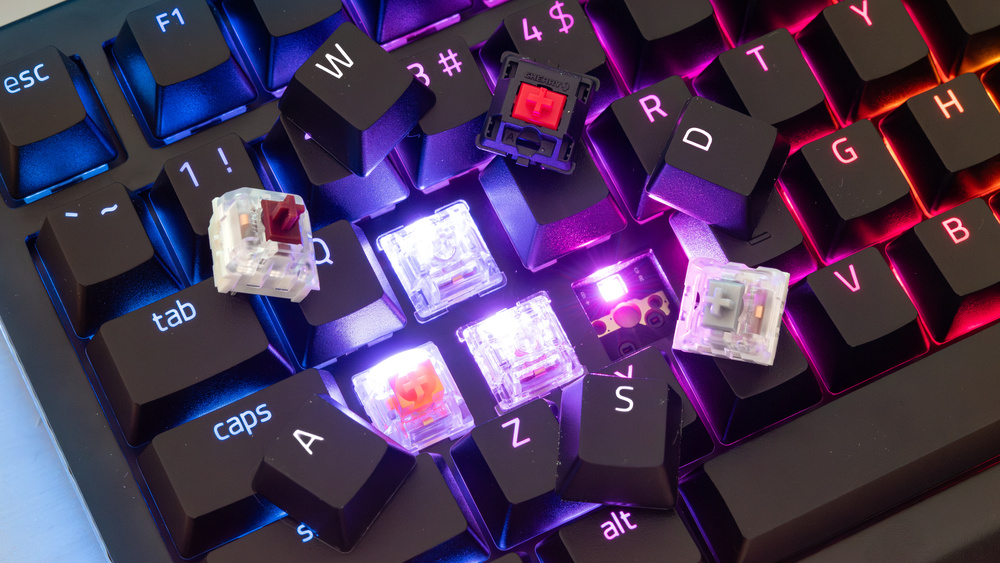

A gaming keyboard is more than a collection of keycaps and RGB lighting. The switches underneath each key determine how every movement, attack, ability, and command feels. For players who spend hours competing or exploring virtual worlds, that small mechanical component can have a noticeable impact on comfort and control. eurogamersonline compares different mechanical keyboard switches by focusing on how they respond to different play styles rather than treating one switch type as universally superior.
Mechanical switches generally fall into three familiar categories: linear, tactile, and clicky. Each creates a different combination of movement, resistance, feedback, and sound. Some players want a smooth keypress for rapid movement, while others prefer a tactile bump that confirms every command. There are also silent variants for gamers who share rooms or stream regularly. The right choice ultimately depends on the games you play, your hand pressure, your tolerance for sound, and whether the keyboard will also be used for work or typing.
Understanding the Main Mechanical Switch Types
Before comparing switches for specific genres, it helps to understand what separates the major categories. A linear switch moves smoothly from the top of its travel to the bottom without a noticeable bump. This uninterrupted motion makes linears popular among players who repeatedly press movement and action keys.
Tactile switches introduce a physical bump during the keypress. That bump provides feedback, allowing your fingers to recognize that a key has registered without relying entirely on bottoming out. Clicky switches add an audible click to that tactile experience, making each press both physically and acoustically noticeable.
The difference is not simply about speed. A switch that feels fast to one player may feel too sensitive to another. Likewise, a heavier switch might seem slow initially but could provide better control for someone who frequently makes accidental presses.
Linear Switches for Fast and Competitive Gameplay
Linear switches are particularly attractive for fast-paced gaming because the keypress is smooth and uninterrupted. There is no tactile bump that your finger needs to overcome. This can make repeated presses feel consistent, especially when controlling movement with keys such as W, A, S, and D.
For competitive first-person shooters, this smoothness can be appealing when players frequently alternate between movement, crouching, jumping, and quick directional changes. A light-to-medium linear switch can also feel comfortable during long sessions because relatively little force is required to activate the key.
However, lighter is not automatically better. Extremely light switches can cause accidental inputs if a player rests their fingers heavily on the keys. eurogamersonline recommends considering personal finger pressure instead of choosing a switch solely because its specifications suggest faster operation.
Linear switches are a strong option for:
- Competitive FPS players
- Fast-paced action games
- Rhythm and reaction-based games
- Players who prefer smooth key travel
- Gamers who frequently repeat the same inputs
Tactile Switches for Control and Feedback
Tactile switches take a different approach. Instead of providing a completely smooth keypress, they introduce a noticeable bump that gives the player physical confirmation. This can be useful when precision and deliberate inputs matter more than simply pressing keys as quickly as possible.
Strategy games, management titles, role-playing games, and general-purpose gaming can all benefit from tactile feedback. Players may spend considerable time navigating menus, issuing commands, typing messages, or activating abilities. The bump can make the keyboard feel more controlled and communicative.
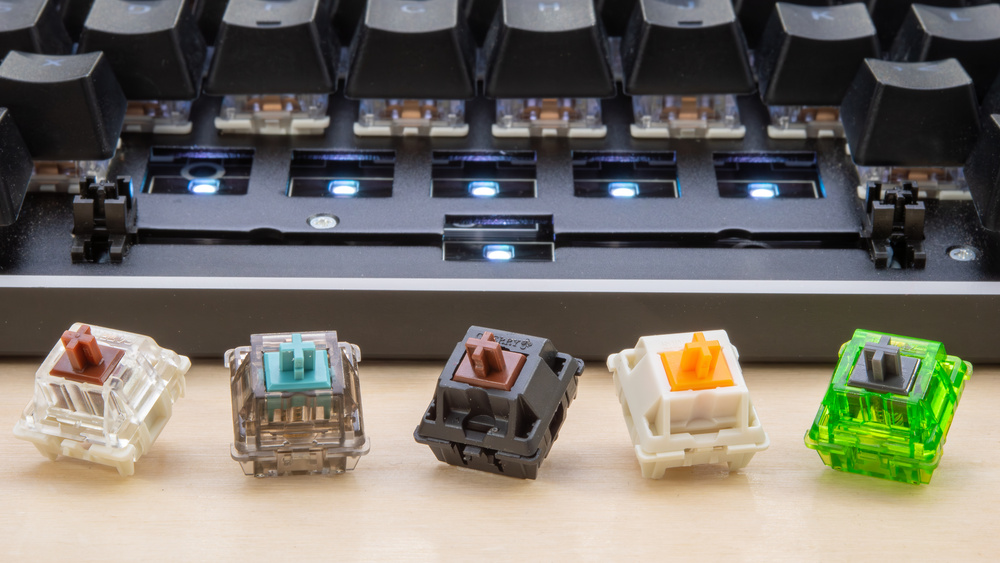
Tactile switches are also attractive to gamers who use the same keyboard for productivity. Writing, coding, browsing, and gaming can all feel balanced when the switch provides feedback without the loud sound associated with traditional clicky designs.
The strength of the tactile bump varies considerably between switch models. Some feel subtle, while others provide a much more pronounced resistance point. eurogamersonline suggests testing different tactile switches whenever possible because two switches labeled as tactile can feel dramatically different under the fingers.
Clicky Switches for Players Who Love Audible Feedback
Clicky switches combine tactile feedback with a deliberate sound. For some gamers, that sharp click creates a satisfying rhythm that makes every input feel more pronounced. The sound can make long typing sessions enjoyable and can give individual keypresses a strong sense of confirmation.
Clicky switches can work particularly well for players who game in private rooms and do not have to worry about disturbing others. They can also appeal to streamers who enjoy the character of mechanical keyboard sounds, although microphone placement and audio settings should be considered carefully.
The major disadvantage is noise. A clicky switch can become distracting during voice chat, shared-room gaming, office work, or late-night sessions. Someone who enjoys the sound personally may discover that everyone nearby has a different opinion.
Clicky switches are generally best suited to:
- Solo gaming setups
- Players who enjoy pronounced feedback
- Gamers who also type extensively
- Private workspaces
- Users who specifically enjoy mechanical keyboard sounds
Choosing Switches by Gaming Genre
Different gaming genres place different demands on keyboard interaction. A player who spends most of their time in tactical shooters may value smooth repeated inputs, while someone focused on MMORPGs may prioritize comfort during long sessions and frequent ability commands.
eurogamersonline approaches switch selection by connecting mechanical characteristics with actual gaming habits rather than relying on simple claims such as “red switches are always best for gaming.”
| Gaming Style | Recommended Switch Type | Main Advantage | Consideration |
|---|---|---|---|
| Competitive FPS | Light Linear | Smooth repeated inputs | May feel too sensitive |
| Battle Royale | Linear | Fast movement control | Limited tactile feedback |
| MOBA | Linear or Tactile | Consistent ability inputs | Personal preference matters |
| RPG/MMORPG | Tactile | Clear feedback and comfort | Strong bumps may feel tiring |
| Strategy | Tactile | Deliberate keypresses | Slightly less smooth |
| Casual Gaming | Tactile or Linear | Versatile feel | Depends on other uses |
| Rhythm Games | Linear | Consistent repeated presses | Very light switches need adjustment |
| Gaming + Typing | Tactile | Balanced feedback | Sound varies by model |
Actuation Force Can Change the Experience
Switch type is only one part of the decision. Actuation force is equally important because it describes how much pressure is required for a key to register. A lightweight switch can feel effortless, while a heavier switch requires more deliberate movement.
For gamers who constantly hold movement keys, lighter switches may reduce the effort required during long sessions. They can feel responsive and easy to activate. However, players with heavier hands may accidentally trigger nearby keys if the switch is extremely light.
Heavier switches provide more resistance. This can make accidental presses less common and may appeal to players who like a firm, deliberate feeling. The tradeoff is that pressing keys repeatedly for several hours can become more tiring for some users.
A useful starting point is to consider how your fingers naturally rest on the keyboard. If you tend to hover lightly, a medium or heavier switch may feel comfortable. If you already type or game with minimal pressure, a lighter option may feel more natural.
Why Actuation Distance Gets So Much Attention
Actuation distance refers to how far a key must travel before registering. Some gaming-oriented switches are designed with shorter actuation points, which can make them feel more immediate.
However, shorter travel is not automatically equivalent to better gaming performance. A player needs enough control to avoid unintended presses. For competitive games, a highly sensitive setup can be useful when properly configured, but it can also punish careless finger placement.
This is especially relevant for players switching from a traditional membrane keyboard. The change in sensitivity may require an adjustment period before the new keyboard feels natural.
Instead of selecting the shortest possible actuation distance, players should ask:
- Do I accidentally press nearby keys?
- Do I frequently use rapid repeated inputs?
- Do I rest my fingers on movement keys?
- Do I mainly play competitive or relaxed games?
- Will I also use the keyboard for writing?
Silent Switches for Shared Gaming Spaces
Gaming does not always happen in an isolated room. Many players share bedrooms, apartments, offices, or living spaces. In these situations, keyboard noise can become just as important as key feel.
Silent mechanical switches use dampening components to reduce the sound produced during keypresses. They do not necessarily make a keyboard completely silent, because keycaps and the keyboard case can still create noise, but they can significantly reduce the sharp impact associated with louder switches.

For gamers who play late at night, participate in voice calls, or stream from a shared room, silent switches can be a practical compromise. They preserve the mechanical feel while reducing the amount of noise traveling through the room.
eurogamersonline considers silent switches particularly useful for players who want gaming performance without turning every match into an audible keyboard session.
Hot-Swappable Keyboards Make Experimenting Easier
Choosing a switch can feel intimidating when you have never experienced the differences personally. A hot-swappable keyboard makes experimentation much easier because compatible switches can be replaced without permanently committing to one configuration.
This is valuable for gamers who are unsure whether they prefer linear or tactile feedback. A player could start with a moderate linear setup and later experiment with a tactile option. Some enthusiasts even create customized configurations based on the keys they use most.
For example, a gamer might prefer one feel for frequently used movement keys and another for less frequently pressed controls. However, mixing switches requires careful consideration of consistency, force, and overall feel.
Before buying replacement switches, check:
- Switch compatibility
- Three-pin or five-pin support
- Plate and PCB configuration
- Actuation characteristics
- Spring weight
- Sound profile
Switches for Long Gaming Sessions
Comfort becomes increasingly important when gaming sessions last several hours. A switch that feels exciting for thirty minutes may become tiring after an entire evening.
Light switches can reduce the effort required for repeated keypresses, while medium-weight tactile switches may provide a useful balance between feedback and resistance. Heavier switches can feel satisfying to players who prefer deliberate inputs but may require more physical effort.
The best approach is to consider your complete routine rather than gaming alone. If you spend four hours gaming followed by several hours working or studying, the switch should remain comfortable across both activities.
eurogamersonline emphasizes that personal comfort should be treated as a performance factor. A technically impressive switch is not useful if it causes discomfort or makes you constantly adjust your hand position.
Common Mistakes When Choosing Mechanical Switches
Many first-time buyers make the mistake of focusing on switch colors. Although colors are commonly associated with particular switch families, manufacturers can use different designs and specifications under similar color names.
Another mistake is assuming that lighter switches are always faster. Speed depends on the entire input system and the player’s ability to control it. A switch that is too sensitive can create unwanted commands.
Other common mistakes include:
- Buying without considering keyboard noise
- Ignoring actuation force
- Choosing based only on gaming marketing
- Forgetting about typing and productivity
- Assuming every tactile switch feels identical
- Selecting switches without checking compatibility
- Prioritizing specifications over personal comfort
How to Find Your Ideal Switch
There is no universal mechanical switch that dominates every gaming style. Your ideal choice comes from matching the switch characteristics to the way you actually play.
If your priority is rapid movement and repeated inputs, start by exploring linear switches. If you want physical confirmation without excessive noise, tactile switches are a strong middle ground. If you love an audible response and primarily use your keyboard in a private space, clicky switches may provide the experience you want.
Players who remain uncertain should try a switch tester before purchasing a complete set. Even a short hands-on test can reveal differences that specifications cannot fully describe.
Think about three factors first: feel, force, and sound. Once those preferences are clear, technical specifications become much easier to evaluate.
Conclusion
Mechanical keyboard switches can change how a gaming setup feels without changing the games themselves. The difference comes from the relationship between your fingers and each key: how smoothly it moves, how much resistance it provides, when it activates, and what kind of feedback it delivers. Linear switches remain attractive for players who value smooth and consistent movement. Tactile switches provide a balanced experience for gamers who want physical feedback and also use their keyboard for everyday tasks. Clicky switches deliver the strongest audible character but require a suitable environment. Silent variants offer another path for players who need reduced noise.

